
UGC NET UGC NET Paper 1: Teaching and Research Aptitude
Unit 8 · 13 min read · Updated 26 Nov 2026
As per the UGC NET syllabus notified by the National Testing Agency (NTA)
Contents
INFORMATION AND COMMUNICATION TECHNOLOGY (ICT) is the eighth unit of Paper 1 and one of the most fact-based. ICT means all the technologies used to create, store, process and share information: computers, the internet, mobile phones, television and the software that runs on them. The syllabus has four parts: ICT abbreviations and terminology, the basics of the internet, intranet, e-mail and audio-video conferencing, digital initiatives in higher education, and ICT and governance. Since many questions simply ask the full form of an abbreviation or the purpose of a portal, careful revision of this chapter gives quick marks.
8.1 ICT Abbreviations and Terminology
Questions often ask for the full form of an abbreviation. Learn them in groups, so that each one reminds you of the next:
| Abbreviation | Full form | Abbreviation | Full form |
|---|---|---|---|
| CPU | Central Processing Unit | ALU | Arithmetic Logic Unit |
| RAM | Random Access Memory | ROM | Read Only Memory |
| EPROM | Erasable Programmable ROM | EEPROM | Electrically Erasable Programmable ROM |
| BIOS | Basic Input Output System | GUI | Graphical User Interface |
| HTML | HyperText Markup Language | HTTP(S) | HyperText Transfer Protocol (Secure) |
| URL | Uniform Resource Locator | WWW | World Wide Web |
| ISP | Internet Service Provider | IP | Internet Protocol |
| TCP | Transmission Control Protocol | FTP | File Transfer Protocol |
| SMTP | Simple Mail Transfer Protocol | POP3 / IMAP | Post Office Protocol 3 / Internet Message Access Protocol |
| DNS | Domain Name System | VoIP | Voice over Internet Protocol |
| LAN / MAN / WAN | Local / Metropolitan / Wide Area Network | Wi-Fi | wireless networking (IEEE 802.11 standards) |
| USB | Universal Serial Bus | HDMI | High-Definition Multimedia Interface |
| Portable Document Format | JPEG / GIF | Joint Photographic Experts Group / Graphics Interchange Format | |
| ISDN | Integrated Services Digital Network | PSTN | Public Switched Telephone Network |
| OCR | Optical Character Recognition | MICR | Magnetic Ink Character Recognition (bank cheques) |
| ASCII | American Standard Code for Information Interchange | IoT / AI | Internet of Things / Artificial Intelligence |
8.2 Computer Basics: Hardware, Software, Memory and Security
- Hardware is the physical part of a computer: input devices (keyboard, mouse, scanner, microphone), the CPU (with its ALU and control unit), output devices (monitor, printer, speaker) and storage devices.
- Software is the set of programs. System software runs the computer (operating systems such as Windows, Linux, Android; drivers), while application software does particular jobs (word processors, browsers, spreadsheets). Open-source software (such as Linux and LibreOffice) has freely available source code.
- Primary memory: RAM is fast and volatile, i.e. its data are lost when power goes off; ROM is non-volatile and stores the start-up instructions (BIOS). Cache memory is the fastest and sits between the CPU and RAM. Secondary memory (hard disk, SSD, pen drive, DVD) stores data permanently.
- Units of memory: 1 bit (0 or 1); 4 bits = 1 nibble; 8 bits = 1 byte; 1 KB = 1,024 bytes; then MB, GB, TB, PB, each 1,024 times the previous.
- Number systems: binary (base 2), octal (base 8), decimal (base 10) and hexadecimal (base 16). Computers work in binary. ASCII uses 7 bits for 128 standard characters, and Unicode covers the scripts of the world, including Indian languages.
- Generations of computers: first, vacuum tubes; second, transistors; third, integrated circuits; fourth, microprocessors; fifth, artificial intelligence.
- Security: malware includes viruses (attach to files), worms (spread by themselves), Trojan horses (look harmless), ransomware (lock data for money) and spyware. Phishing tricks users into giving passwords through fake messages. A firewall blocks unauthorised access, antivirus removes malware, and encryption protects data in transit.
- Cloud computing provides computing over the internet as SaaS (software as a service, such as web e-mail), PaaS (platform) and IaaS (infrastructure).
8.3 The Internet, Intranet and Computer Networks
The internet is a global network of networks that communicate using the TCP/IP protocols. It grew from ARPANET, a US defence research network started in 1969. The World Wide Web is not the same as the internet: it is a system of linked web pages on the internet, proposed by Tim Berners-Lee at CERN in 1989. We view web pages through a browser and find them through a search engine.
- IP address: a unique number for each device on a network. IPv4 uses 32 bits and IPv6 uses 128 bits, so IPv6 allows vastly more addresses.
- Domain names are easy names for IP addresses, translated by the DNS. Generic domains include .com, .org, .edu and .gov; country codes include .in (India). ICANN coordinates domain names and IP addresses globally.
- Connectivity options: dial-up, DSL and broadband, cable, fibre (FTTH), satellite, mobile data (3G, 4G, 5G) and Wi-Fi hotspots. In India, BharatNet aims to bring broadband to all gram panchayats.
- Intranet: a private network inside an organisation that uses internet technology, such as a university portal accessible only to its staff and students. An extranet opens part of an intranet to outside partners.
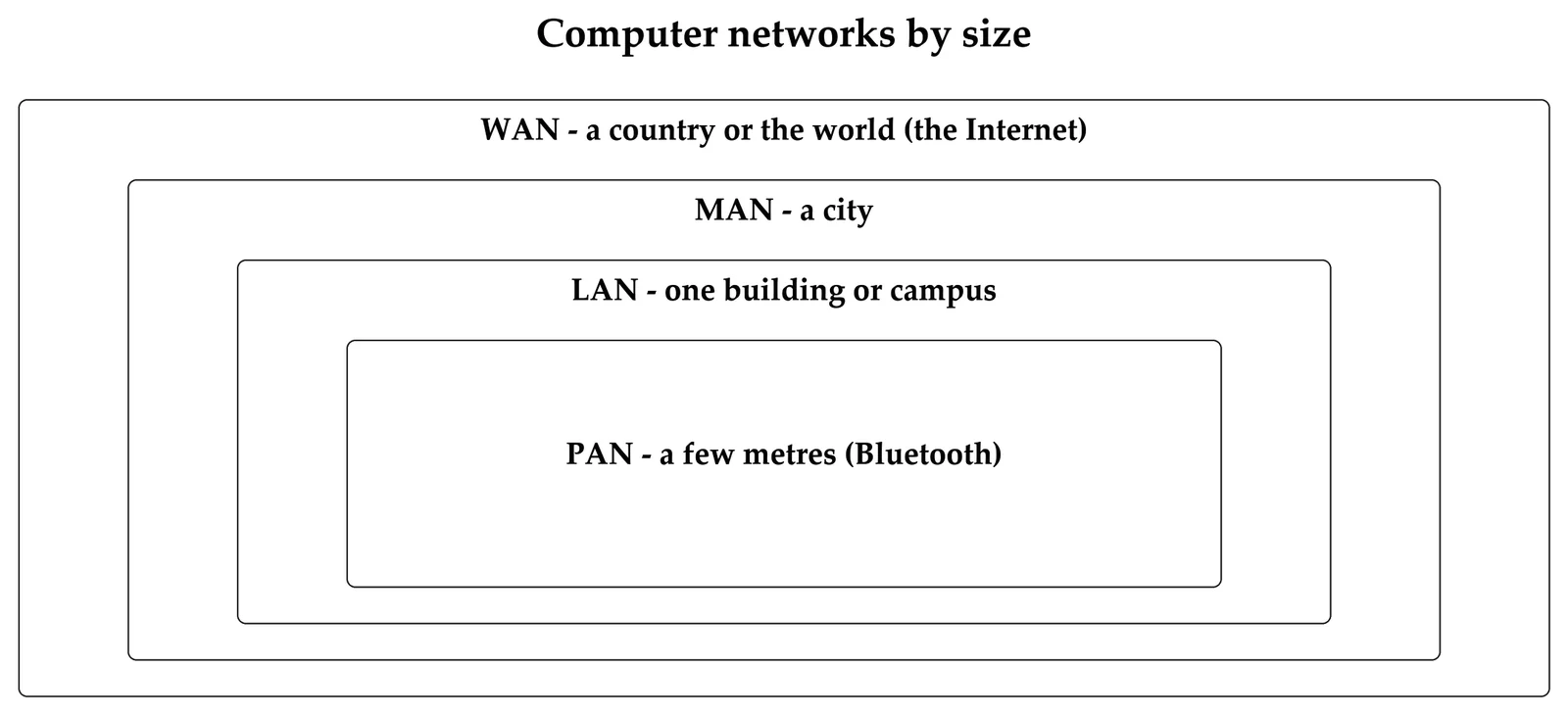
A PAN (personal area network) links devices within a few metres, such as a phone and earphones by Bluetooth; a LAN links computers in one building or campus; a MAN covers a city; and a WAN covers a country or the world, the internet being the largest WAN. Networks are also described by topology, i.e. layout: bus, star, ring, mesh and tree.
8.4 E-mail, Audio Conferencing and Video Conferencing
E-mail (electronic mail) sends messages and files over the internet. Ray Tomlinson sent the first network e-mail in 1971 and chose the @ sign to separate the user name from the computer’s name. An e-mail address has the form username@domain, for example student@university.ac.in. E-mail is sent with the SMTP protocol and received with POP3 (downloads mail to one device) or IMAP (keeps mail on the server and syncs it across devices).
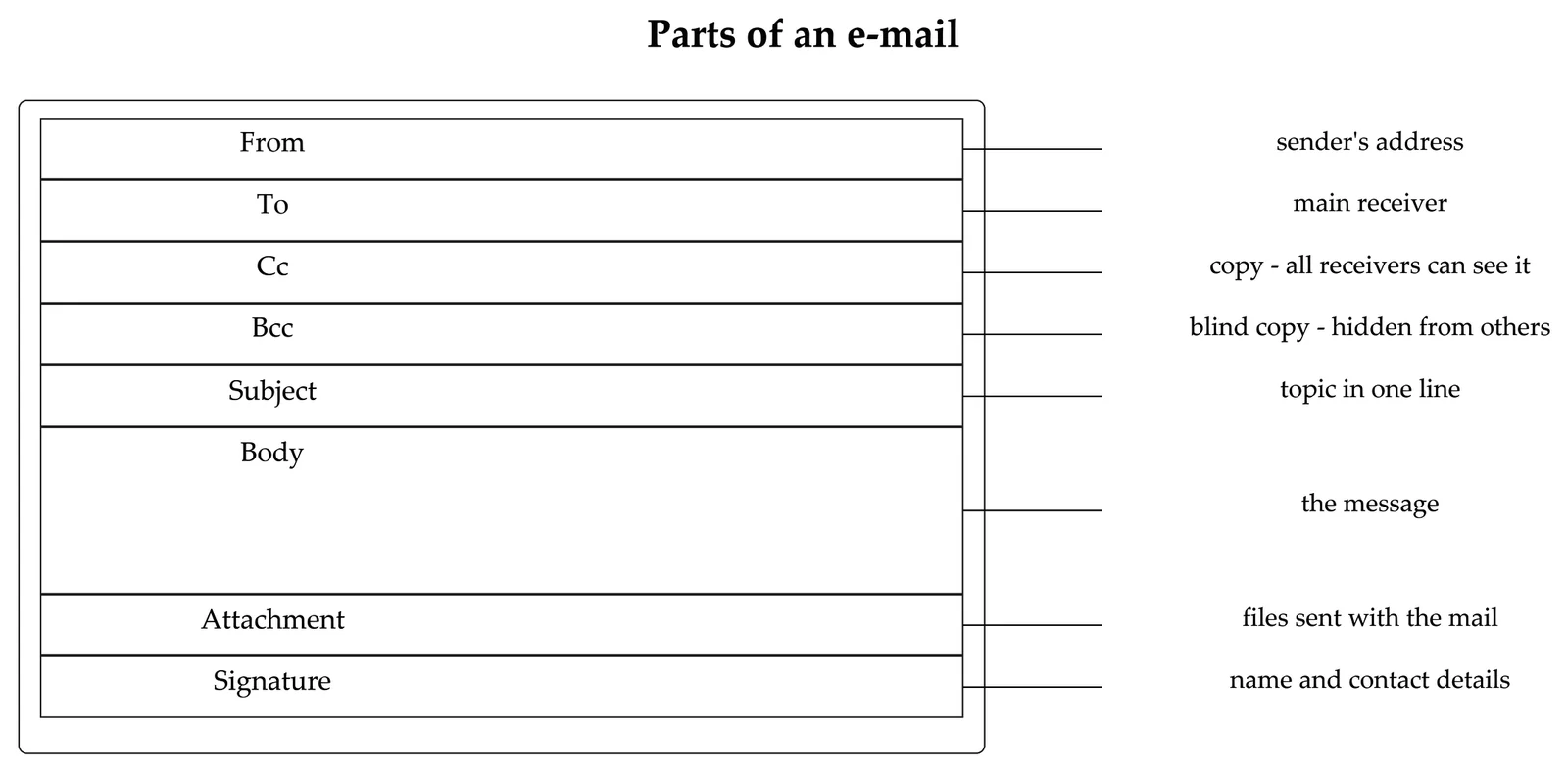
- To: the main receiver. Cc (carbon copy): others who get a copy, and all receivers can see these addresses. Bcc (blind carbon copy): receivers whose addresses are hidden from the others.
- Subject: the topic in one line. Body: the message itself. Attachment: files sent with the mail. Signature: name and contact details at the end.
- Reply answers only the sender; Reply all answers everyone in To and Cc; Forward sends the mail to someone new. Spam is unwanted bulk mail.
- Netiquette (etiquette on the net): clear subject lines, polite language, no ALL CAPITALS (it reads as shouting), and careful use of Reply all.
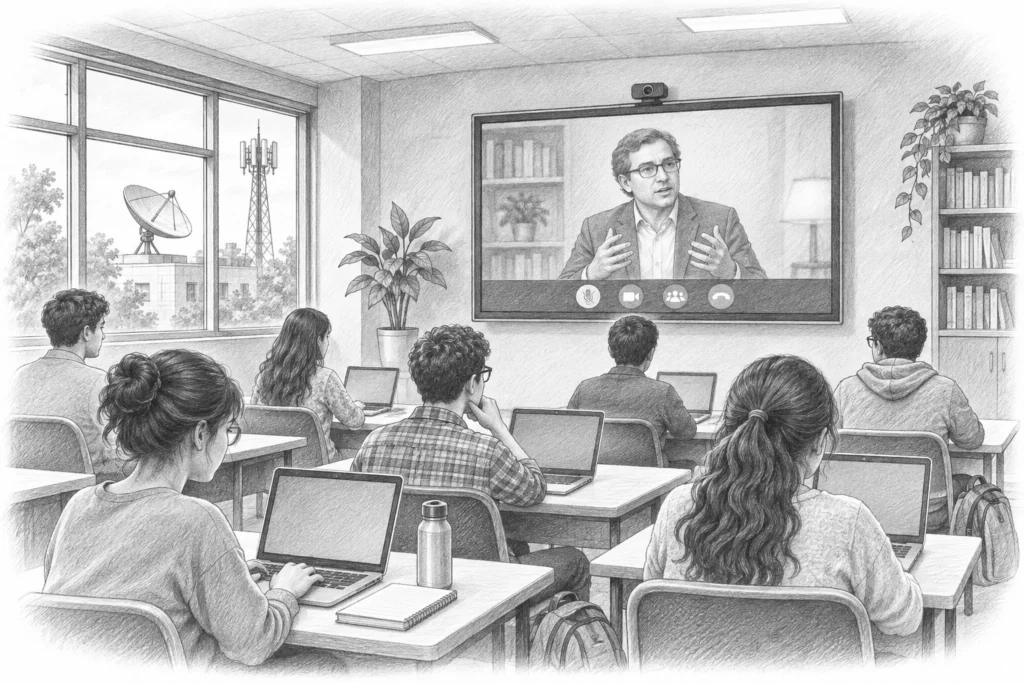
Audio conferencing connects several people by voice through phone lines or the internet (VoIP). Video conferencing adds live video, so participants can see one another and share screens, as in online classes, viva examinations and faculty meetings. It needs a camera, microphone, speakers, a stable internet connection and software or a platform. It saves travel time and cost and widens access to expert teachers, but depends on bandwidth and can tire participants.
8.5 Digital Initiatives in Higher Education
The Government of India, through the Ministry of Education, the UGC, AICTE and INFLIBNET, runs many digital initiatives. Most of them come under the National Mission on Education through ICT (NMEICT), launched in 2009. The most important ones are:
| Initiative | What it does |
|---|---|
| SWAYAM (2017) | free MOOCs from school to postgraduate level, with credit transfer |
| SWAYAM Prabha (2017) | educational DTH television channels broadcasting 24×7 |
| National Digital Library of India (NDLI) | a single-window digital library, developed by IIT Kharagpur |
| National Academic Depository (NAD) | online store of degrees and mark sheets, integrated with DigiLocker |
| Academic Bank of Credits (2021) | stores the credits a student earns, to allow multiple entry and exit |
| e-PG Pathshala | UGC’s e-content for postgraduate subjects, run through INFLIBNET |
| e-ShodhSindhu / Shodhganga | access to e-journals / repository of Indian PhD theses |
| Vidwan | INFLIBNET’s database of experts and faculty profiles |
| Virtual Labs | online laboratories for science and engineering experiments |
| Spoken Tutorial and FOSSEE (IIT Bombay) | training in free and open-source software |
| e-Yantra (IIT Bombay) | robotics and embedded systems education |
| Sakshat (2006) | an early one-stop education portal of the ministry |
| GIAN (2015) | brings foreign faculty to teach short courses in India |
| SPARC (2018) | academic and research collaboration with foreign universities |
| IMPRINT (2015) | IIT- and IISc-led research on national engineering challenges |
| ARIIA | Atal Ranking of Institutions on Innovation Achievements |
| SAMARTH | e-governance software for universities (admissions, records) |
8.6 ICT and Governance
E-governance is the use of ICT to deliver government services, exchange information and make administration simpler, faster, transparent and accountable (sometimes summed up as SMART governance). Its main types are G2C (government to citizens, such as online certificates), G2B (government to business, such as GST filing), G2G (between departments and governments) and G2E (government to employees). Its four pillars are usually given as people, process, technology and resources.
- Information Technology Act, 2000: India’s first cyber law; it gave legal recognition to electronic records and digital signatures and defined cyber offences. CERT-In responds to cyber security incidents.
- National e-Governance Plan (NeGP), 2006: a programme of Mission Mode Projects in areas such as passports, income tax, land records and e-courts, with Common Service Centres (CSCs) as village-level access points.
- e-Kranti (NeGP 2.0), 2015: the next phase, focused on transforming services, and part of Digital India.
- Digital India, launched on 1 July 2015, aims at digital infrastructure for every citizen, governance and services on demand, and digital empowerment, through nine pillars (such as broadband highways, universal mobile access, e-Kranti and IT for jobs).
- Platforms: Aadhaar (unique ID), DigiLocker (digital documents), UMANG (one app for many government services), UPI (instant payments), GeM (online public procurement) and MyGov (citizen participation).
Thus, ICT links the classroom, research and governance. Revise the abbreviations, understand how the internet and e-mail work, and remember what each digital initiative does; this unit then becomes one of the fastest to answer.
8.7 Quiz: 20 Practice MCQs
Test yourself with these 20 exam-pattern questions. Choose your answer first, then tap Show answer to check it and read the short explanation.
Question 1
ROM stands for:
- Read Only Memory
- Random Only Memory
- Read Output Memory
- Rapid Online Memory
Show answer
Answer: (a) Read Only Memory. ROM is non-volatile memory holding start-up instructions
Question 2
Which of the following memories is volatile?
- ROM
- Hard disk
- RAM
- DVD
Show answer
Answer: (c) RAM. RAM loses its data when the power is switched off
Question 3
One byte is equal to:
- 4 bits
- 16 bits
- 2 bits
- 8 bits
Show answer
Answer: (d) 8 bits. 4 bits make a nibble; 8 bits make a byte
Question 4
HTTP stands for:
- High Transfer Text Protocol
- HyperText Transfer Protocol
- HyperText Transmission Program
- Host Text Transfer Protocol
Show answer
Answer: (b) HyperText Transfer Protocol. It is the protocol of the World Wide Web
Question 5
Which protocol is used to send e-mail?
- POP3
- IMAP
- SMTP
- FTP
Show answer
Answer: (c) SMTP. SMTP sends mail; POP3 and IMAP receive it
Question 6
Which statement about ‘Bcc’ in an e-mail is correct?
- All receivers can see each other’s addresses.
- Bcc receivers’ addresses are hidden from other receivers.
- Bcc means ‘best carbon copy’.
- Bcc sends only the attachment.
Show answer
Answer: (b) Bcc receivers’ addresses are hidden from other receivers.. Bcc = blind carbon copy
Question 7
The World Wide Web was proposed by:
- Bill Gates
- Vint Cerf
- Ray Tomlinson
- Tim Berners-Lee
Show answer
Answer: (d) Tim Berners-Lee. Berners-Lee proposed it at CERN in 1989
Question 8
How long is an IPv6 address?
- 32 bits
- 64 bits
- 128 bits
- 256 bits
Show answer
Answer: (c) 128 bits. IPv4 is 32 bits; IPv6 is 128 bits
Question 9
A network that covers a whole city is called a:
- LAN
- PAN
- WAN
- MAN
Show answer
Answer: (d) MAN. Metropolitan Area Network
Question 10
An intranet is:
- a private network used within an organisation
- the public internet
- a satellite television network
- a telephone line
Show answer
Answer: (a) a private network used within an organisation. It uses internet technology but is open only to members of the organisation
Question 11
Match List I with List II.
| List I | List II |
|---|---|
| A. SWAYAM | I. Repository of PhD theses |
| B. Shodhganga | II. Robotics education (IIT Bombay) |
| C. National Digital Library of India | III. Platform for MOOCs |
| D. e-Yantra | IV. Digital library (IIT Kharagpur) |
- A-I, B-III, C-IV, D-II
- A-III, B-I, C-IV, D-II
- A-III, B-IV, C-I, D-II
- A-II, B-I, C-IV, D-III
Show answer
Answer: (b) A-III, B-I, C-IV, D-II. SWAYAM = MOOCs, Shodhganga = theses, NDLI = digital library, e-Yantra = robotics
Question 12
Which of the following is NOT a type of malware?
- Worm
- Trojan horse
- Ransomware
- Firewall
Show answer
Answer: (d) Firewall. A firewall protects against unauthorised access
Question 13
In which year was the Digital India programme launched?
- 2014
- 2015
- 2016
- 2019
Show answer
Answer: (b) 2015. It was launched on 1 July 2015
Question 14
e-Kranti is also known as:
- NeGP 2.0
- Digital India 3.0
- BharatNet
- National Knowledge Network
Show answer
Answer: (a) NeGP 2.0. It is the second phase of the National e-Governance Plan
Question 15
In e-governance, G2C stands for:
- Government to Company
- Group to Citizen
- Government to Citizen
- Government to Commission
Show answer
Answer: (c) Government to Citizen. Services such as online certificates for citizens
Question 16
Standard ASCII uses how many bits to represent a character?
- 7
- 8
- 16
- 32
Show answer
Answer: (a) 7. 7 bits give 128 characters; extended ASCII uses 8
Question 17
Arrange these units of memory in increasing order.
- KB
- GB
- MB
- TB
- I, II, III, IV
- I, III, II, IV
- III, I, II, IV
- I, III, IV, II
Show answer
Answer: (b) I, III, II, IV. KB < MB < GB < TB
Question 18
Assertion (A): RAM is called volatile memory. Reason (R): The data in RAM are lost when the power is switched off.
- Both A and R are true, and R is the correct explanation of A
- Both A and R are true, but R is not the correct explanation of A
- A is true, but R is false
- A is false, but R is true
Show answer
Answer: (a) Both A and R are true, and R is the correct explanation of A. Losing data without power is exactly what ‘volatile’ means
Question 19
The first generation of computers used:
- transistors
- integrated circuits
- microprocessors
- vacuum tubes
Show answer
Answer: (d) vacuum tubes. Then came transistors, ICs and microprocessors
Question 20
The National Academic Depository (NAD), which stores degrees and mark sheets online, is integrated with:
- Aadhaar
- UMANG
- DigiLocker
- BharatNet
Show answer
Answer: (c) DigiLocker. Students can access their academic awards through DigiLocker
More notes: UGC NET Paper 1: Teaching and Research Aptitude
These notes are prepared by PADHO TO AISE for study help. They are not an official publication.